After-school help that stays in your house.
Placement, level-matched practice, and focus tools — with AI on your home network, not the cloud.
What it does — and does not
Funbot helps parents identify gaps, gives practice at the child’s working level, and guides homework without doing it for them. It does not complete assignments, submit schoolwork, or replace a teacher or parent.
How it works
Built for real nights after school — practice that fits your child, and a guide that won’t hand over the answer.
- Verified math cards Grade 1 math isn’t a stack of the same printed worksheet. Funbot matches your child to pre-generated, verified practice cards — the right size numbers, the skill they’re on, at their working level. Those cards are written and checked ahead of time, then picked for the session. Funbot does not invent math problems on the fly, because an AI can get the math wrong if it makes problems up while a child works.
- Mistakes don’t get shrugged off When something’s wrong, Funbot notices. Those problems come back later — with hints, not answers — until the idea sticks. That’s how kids get past the sticky spots instead of skating around them.
- Reading and writing the same way English practice uses skill cards and short pages at the child’s working level. Missed cards can turn into a focused redo sheet so the hard bits get another look.
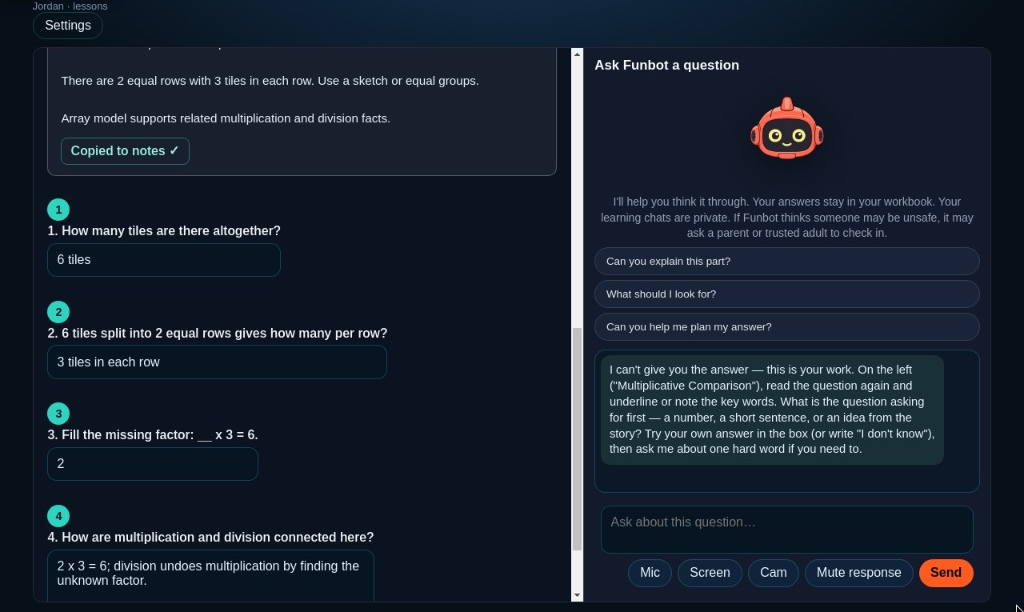
- A coach, not a cheat sheet Ask Funbot how to think through a problem. It asks questions and offers process hints. It will not fill in the blanks for them.
- On your home network The tutor runs in the house. Parent controls stay on the parent PC. Nothing is built around shipping homework to someone else’s cloud.
What it looks like tonight
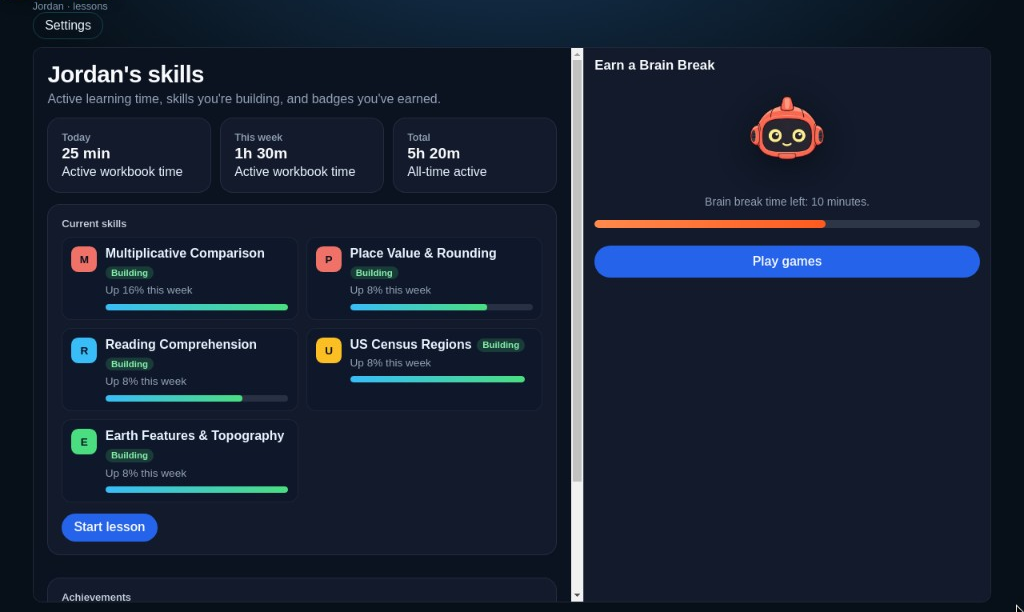
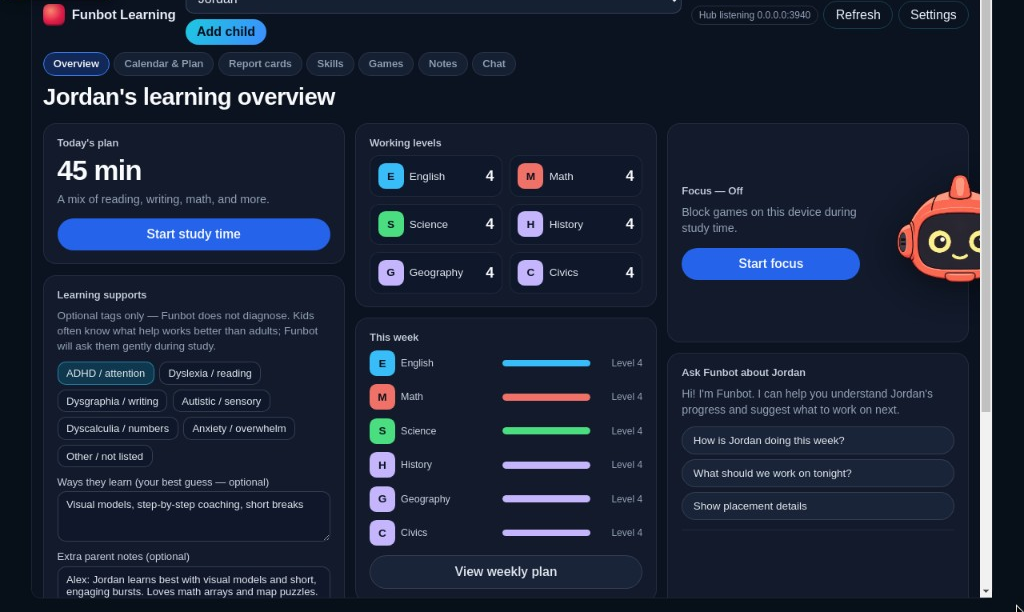
Real screens from the Teacher Trial — parent hub, child practice, and a guide that won’t hand over answers.
Games · Coming feature. Brain-break practice games will unlock after study time in a later update — we’re rebuilding them with more substance before they return in a later update.
How a homework night goes
Built for real evenings — not another login that ships your child’s work to the internet.
- Parent unlocks the hub Set the child, rules, and schedule on the home Windows PC.
- Start at the right level At-grade checks in ELA, math, science, and history — then working levels based on what your child shows today.
- Practice that matches Nightly work at the child’s working level — including verified math cards matched to that skill — with a guide that asks questions instead of handing over answers.
- School homework welcome Photo or import a worksheet. Funbot helps them get unstuck — it won’t do the page for them.
What parents get
Structure for the household that meets your child where they are and helps them build forward.
- Parent hub Ask about progress, where they’re stuck, weekly plans, and notes — one child at a time, on your PC.
- Focus on their machine During study blocks, keep games and distractions off the Windows PC in their room.
- Notes that stick Save what works for your kid so the tutor doesn’t forget tomorrow night.
- Stays on your computers Local AI for home use. The website collects nothing from the app — zero telemetry and zero usage tracking. Everything about your child stays on your home devices unless you explicitly choose to share it with their teacher and school.
Built for children
An AI tool in a kid’s evening only works if parents can see the guardrails.
- Parent controls the profile You set the child profile, subjects, and study schedule.
- Schoolwork stays on your devices Chats, notes, and homework images stay 100% on the family’s computers. Funbot Learning does not collect them. They leave the house only if you explicitly choose to share them with your child’s teacher and school.
- Sources for ELA / research help Reading help is cited; kids can copy material into notes for a parent to review.
- No ads, no social feed, no strangers No public profiles and no “chat with the internet.”
- You can review progress Parent hub shows progress, saved notes, and weekly report cards.
More detail: Privacy · How local AI works
What you need
You do not need a brand-new gaming PC. You do need a Windows home setup.
- Windows 10 or 11 (64-bit) The desktop app is Windows today. Mac / Chromebook installs are not available yet.
- A normal household PC for the parent hub The AI runs on the parent machine. A discrete GPU helps, but hybrid and CPU-only modes exist for lighter hardware (slower replies).
- Child on another PC or tablet Child can use the same Windows app on their PC, or a browser on your home Wi‑Fi talking to the parent hub.
- Parent hub on during sessions For a separate child device, the parent PC (hub) usually needs to be on and on the same home network.
- Internet for setup; local for tutoring First-time model/runtime download needs internet. Day-to-day tutoring is designed to stay on your home network after that.
Why it stays home
Most “AI tutors” send prompts and homework to someone else’s servers. Funbot is built the other way around.
The tutor runs on your home network. Parent controls stay on the parent PC. The website and Funbot Learning collect no data from the app — zero telemetry and zero usage tracking. Child data stays 100% on your home devices unless you explicitly choose to share it with your child’s teacher and school.
How local AI worksFor teachers
We’re testing with educators now. A school portal with classroom invites is on the roadmap — parents stay in control of what gets shared.
If you teach and want early access for evaluation, email us.
Email about teacher evaluationContent is currently being reviewed by educators during testing. Public screenshots and trial access will be shared after that review and final polish. Expected launch date: Cyber Monday, November 30, 2026.
Simple pricing
One household purchase for core home use — not a monthly tutor bill.
- $100 USD one-time for the household Multiple children on one parent hub. Parent PC + child PC/tablet on your home network. No per-seat fee for ordinary family use. Purchases are not open yet.
- Launch offer: $75 USD Planned price for the first 100 purchases at launch. Checkout is not open.
- Expected launch date: Cyber Monday, November 30, 2026.
- Updates for the home product Planned product updates for the local home app are included. Optional school portal features, if/when they ship, may be separate — we’ll say so clearly.
- No subscription required for core local tutoring Home use is designed as a one-time unlock, not a monthly cloud seat.
- 14-day trial at public launch Goal: try the real product first. Final trial rules (including whether a card is required) will be published before sales open.
- Free path for need If $100 isn’t possible, ask. Same product — we plan a no-shame free path.
Get notified when trial opens
Funbot Learning is launching as a home-first learning tool built and tested with real family feedback. We’ll keep improving it through regular updates as more families use it. No spam — we’ll email when the 14-day trial is ready. Planned price $100 USD. Launch offer $75 USD for the first 100 purchases at launch. Expected launch date: Cyber Monday, November 30, 2026.
Prefer mail? [email protected] · Parent FAQ
Purchases are not open
Expected launch date: Cyber Monday, November 30, 2026.
Families in need
If $100 isn’t possible right now, email us. We plan a free path for families who need it — same product, no shame.
Request free access